// FOTO · ORE · RAPPORTI PDF

The site,
documented.

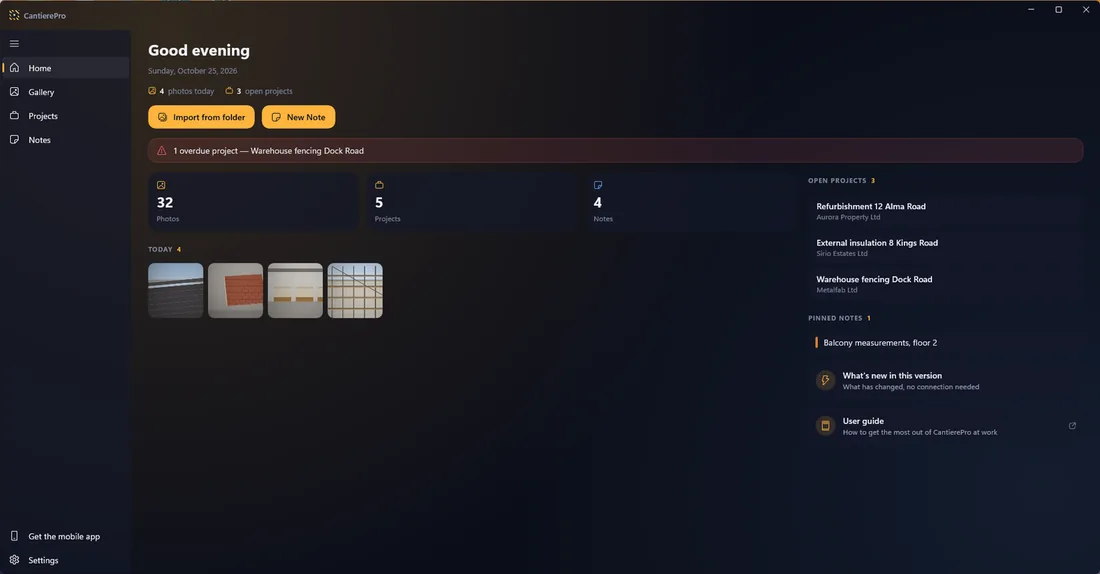
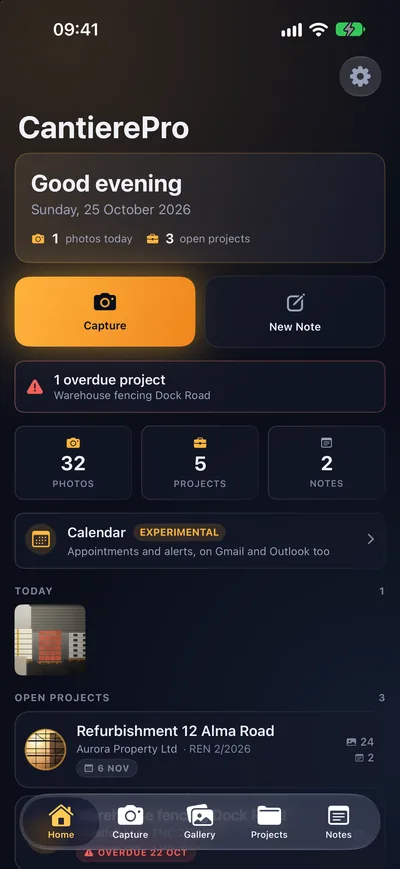
Every photo comes stamped with date, time, GPS coordinates and address. Projects, hours and costs under control. And your client gets a PDF report with your signature on it: one file, and it holds up.

Google Play and the Google Play logo are trademarks of Google LLC. Apple and the Apple logo are trademarks of Apple Inc. Microsoft and the Microsoft Store logo are trademarks of Microsoft Corporation.

See the features

On the App Store, Google Play and the Microsoft Store — iPhone, iPad, Mac, Android and Windows

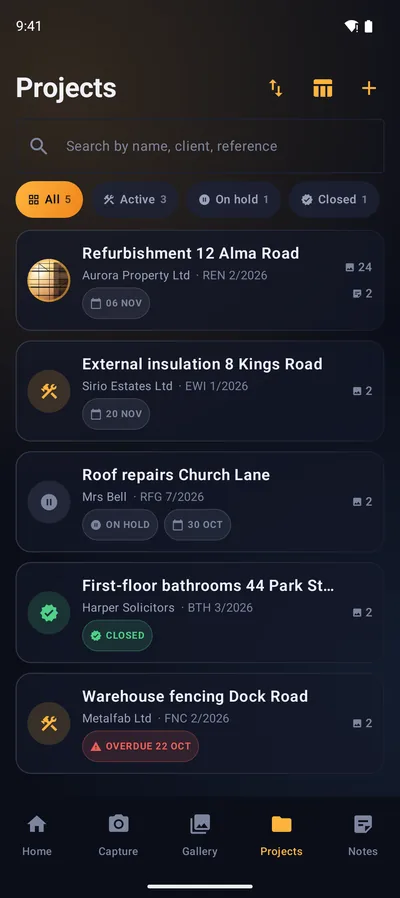
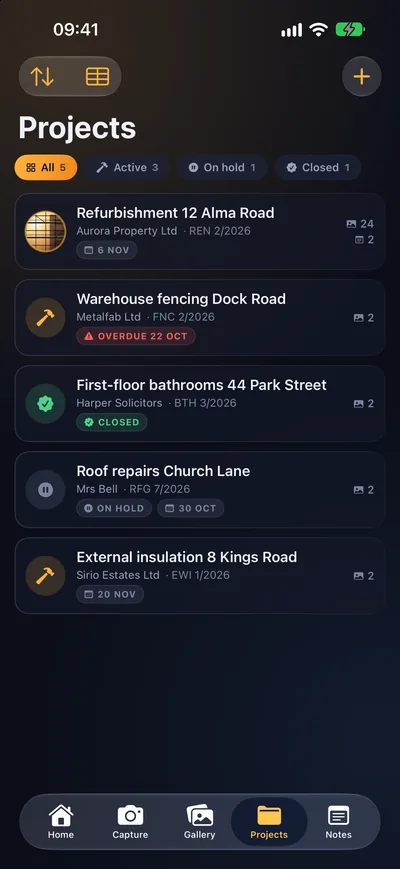
The Projects screen in CantierePro: list of jobs with status, due dates and number of photos
5platforms — iPhone, iPad, Mac, Android and Windows
5languages supported
1PDF file to hand over
0outside servers — your data stays yours

For contractors · surveyors · tradespeople · foremen · anyone who’s actually out on site

// FUNZIONI

The whole site, in one app.

From the first photo to the last progress report: everything lands in the right project on its own.

Photos that hold up as proof

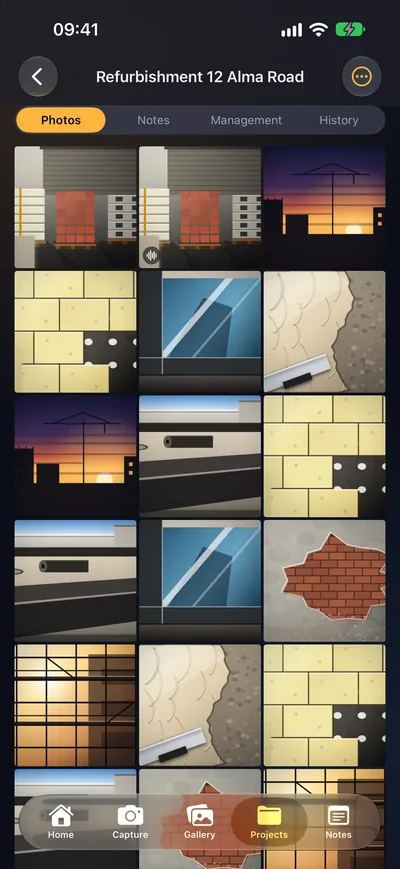
Date, time, GPS coordinates and address stamped right on the photo. When you have to show what the wall looked like before the plaster went on, you already have the proof.

PDF reports with your brand on them

Logo, company name and signature. Photos numbered in date order, with coordinates and notes attached. One single file to send the client.

Projects under control

Client, amount, reference, address and due date. Work progress at a glance, with deadlines front and center and reminders before the due date.

Costs, hours and progress reports

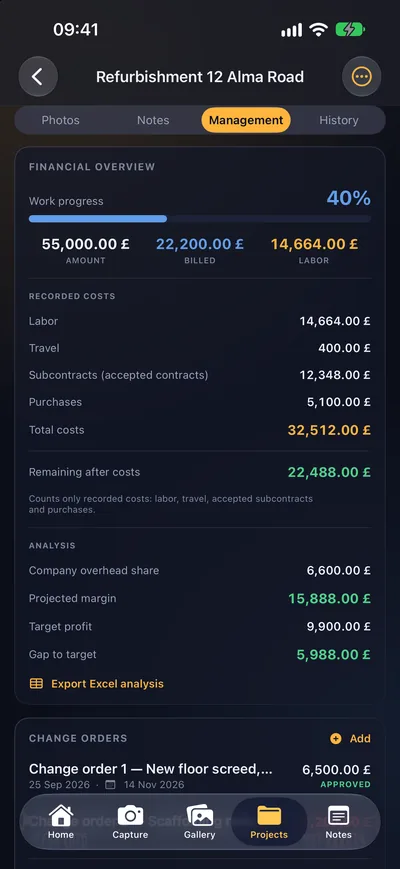
Hours and hourly cost per person, progress reports with amounts, subcontracts and purchases with a scanned delivery note. Margin and remaining figures calculated for you, analysis exportable to Excel.

Notebooks and sketches

Pads for notes, measurements and sketches. On iPad you write by hand with Apple Pencil; grid, ruled or blank pages, always inside the project.

Voice notes and video

Talk while you work instead of typing with your gloves on: voice notes attach straight to the photos. And when a photo isn’t enough, shoot a video.

// LA PROVA

Stamped on the photo.
In black and white.

Disputes over the “when” and the “where”? Every photo comes out with the date, time, coordinates and address already printed on it, and lands in the right project — no hunting for it later.

  • Date, time and location stamped directly on the image
  • Filed automatically in the open project
  • Voice notes attached to the photo
  • Video when a photo isn’t enough
A real CantierePro photo: exposed masonry with the date, time and address stamp printed at the bottom of the shot

// LA CONSEGNA

From the site to the client: one single file.

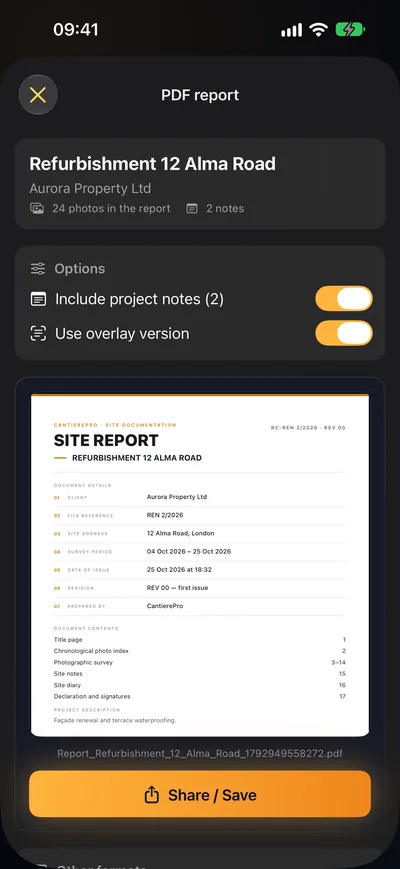
When the job wraps, you don’t spend the evening laying out pages: the report builds itself, with your logo, your company name and your signature. Photos numbered, in date order, notes attached. You email it and it’s done.

  • Header with logo and company name
  • Numbered photos with coordinates and address
  • Signature at the bottom and site notes
  • Cost analysis exportable to Excel too

// I CONTI

The numbers add up. On their own.

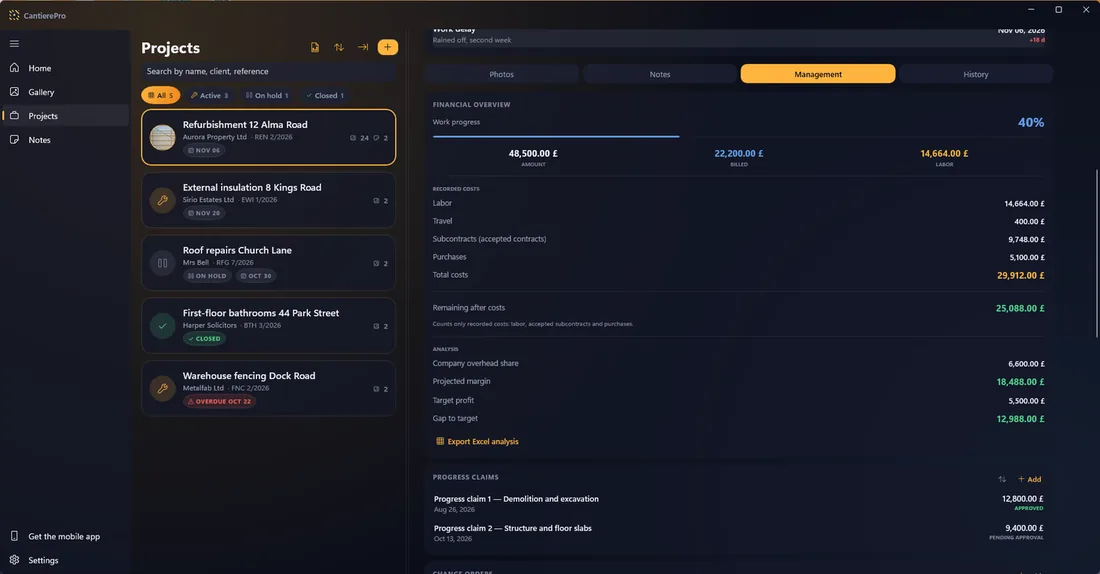
You log hours, purchases and subcontracts as they happen: billed, labor and remaining figures update in real time. You see the margin before it’s too late, not once the job is closed.

  • Hours and hourly cost for every person, month by month
  • Progress reports with amounts and approval
  • Lump sum or hourly subcontracts, supply and installation
  • Delivery note scanned and kept in the project
The financial overview of a project in CantierePro: work progress, amount, billed and labor

// COME FUNZIONA

Three moves. Zero evenings at the computer.

01

Capture

Photos and videos with a GPS stamp, straight into the right project. Dictate your notes out loud, gloves and all.

02

Record

Hours, purchases with delivery notes, subcontracts and progress reports. Totals and margin add up on their own.

03

Deliver

One tap: PDF report with logo and signature, ready to email to the client.

// PIATTAFORME

On all three. Wherever you work.

CantierePro is on all three stores: the App Store, Google Play and the Microsoft Store. On Apple one purchase covers iPhone, iPad and Mac; on Android and Windows you download from their own stores. Same projects, same photos with the date and GPS stamped on them, same PDF reports to hand over.

Apple iPhone · iPad · Mac New in 1.1: now on Mac too Available now
Android Phones and tablets New: updated to version 1.1 Available now
Windows Office computers New: now on the Microsoft Store too Available now

Your projects stay yours on any system: changing phone or computer means nothing has to be redone.

Your data stays yours.

We don’t run servers: your photos and projects sit on your device and, if you turn on sync, in your own private iCloud storage. We don’t collect data, we don’t profile you, we don’t sell anything to anyone.

On your deviceYour archive lives on your iPhone, iPad and Mac. It works with no signal at all, right there on site.
Private iCloudSync uses your own personal iCloud storage; nothing goes through us.
Exportable backupYou can export the full archive whenever you want. Your data is never held hostage.

// PREZZI

Start free. Upgrade to Pro when it pays off.

Free

0 €forever

  • Up to 3 projects
  • Unlimited photos with GPS stamp
  • 1 subcontract and 1 purchase per project
  • PDF report with watermark
  • Notebooks and notes
Download free
7-day free trial

CantierePro PRO

9,99 €per month

or €79.99/year — save four months

  • Unlimited projects
  • Reports with no watermark, with logo and signature
  • Unlimited subcontracts and purchases
  • Full analysis and Excel export
  • iCloud sync and backup
  • Voice notes and video
Try Pro free

Cancel anytime, from your Apple Account settings.

// FAQ

FAQ

Where do my photos and my data end up?

On your device. We don’t run servers: if you turn on sync with the Pro subscription, your data only travels inside your own private iCloud storage, tied to your Apple Account.

Does it work without a connection, out on site?

Yes. Photos, notes, hours and costs all record offline; once you get signal again, iCloud re-syncs your devices on its own.

Which devices can I use it on?

iPhone, iPad and Mac, with the same Apple Account. On iPad you write in the notebooks by hand with Apple Pencil; on iPhone and Mac with the keyboard. Android and Windows versions are in development: they will bring the same projects, the same stamped photos and the same PDF reports.

Can the PDF report be customized?

With Pro the PDF comes out with your logo, your company name and your signature, and no watermark. The photos are numbered, in date order, with coordinates and address.

How do I cancel the subscription?

Anytime, from your Apple Account settings, with no penalties and no phone calls. You can stop the 7-day trial before it renews.

Do I need an account to use it?

No. You download it from the App Store and open your first project: no sign-up, no email, no data required. The Pro subscription, if you turn it on, goes through your Apple Account.

// SCARICA

Take your site to the next level.

Free to start, no sign-up, no data required. You download it, open your first project and start shooting.

Google Play and the Google Play logo are trademarks of Google LLC. Apple and the Apple logo are trademarks of Apple Inc. Microsoft and the Microsoft Store logo are trademarks of Microsoft Corporation.

Available on the App Store, Google Play and the Microsoft Store — for iPhone, iPad, Mac, Android and Windows.